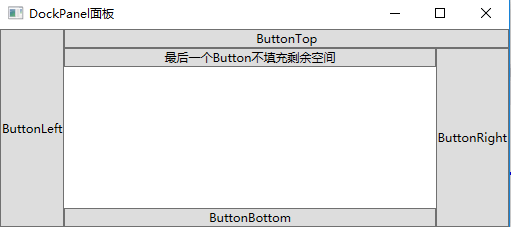
DockPanel 是 WPF 中的一个布局面板,它允许你将子元素“停靠”在其边缘(上、下、左、右),而最后一个没有设置 Dock 的元素会自动填满剩余的空间。
它非常适合用于像“工具栏+主内容”这种结构化布局。
1、填充整个剩余空间
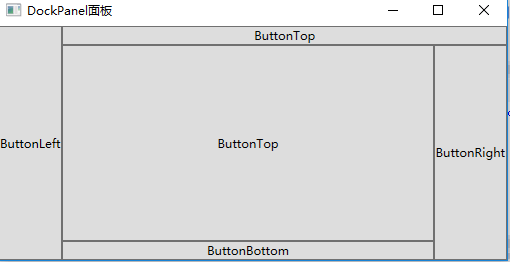
<Window x:Class="WpfDemo.MainWindow"
        xmlns="http://schemas.microsoft.com/winfx/2006/xaml/presentation"
        xmlns:x="http://schemas.microsoft.com/winfx/2006/xaml"
        Title="DockPanel面板" Height="237" Width="525" WindowStartupLocation="CenterScreen">
    <DockPanel>
        <Button DockPanel.Dock="Left" Content="ButtonLeft"></Button>
        <Button DockPanel.Dock="Top" Content="ButtonTop"></Button>
        <Button DockPanel.Dock="Right" Content="ButtonRight"></Button>
        <Button DockPanel.Dock="Bottom" Content="ButtonBottom"></Button>
        <Button  Content="ButtonTop"></Button>
    </DockPanel>
</Window>
2、最后元素不填充剩余空间